Can't see images? Click here to view online. |
|
|
|
Important Update:
Introduction of a New 14 Day "Grace Period"
Dear {{customFields.573887}},
We are introducing a 14 day grace period for ID Card and training expiries to provide greater flexibility while maintaining compliance standards..
All representatives will continue to receive reminder notifications 1 month, 21 days, 14 days, and 7 days before their expiry date. |
|
|
|
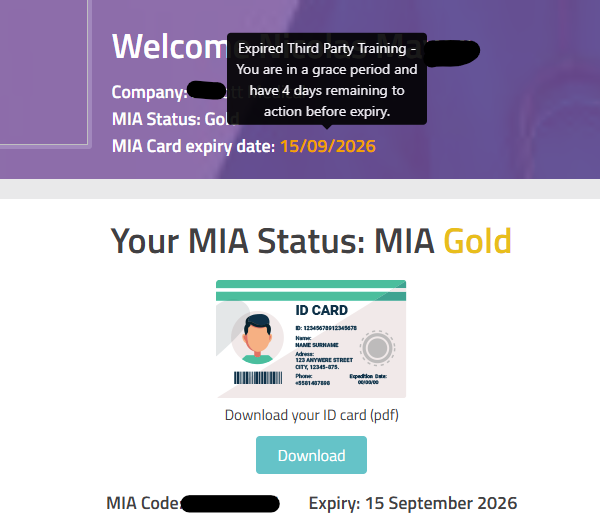
| | On the dashboard, the MIA ID Card expiry date will turn orange, with a pop-up message explaining what has expired.
Representatives will receive a final email notification advising that they have entered the grace period and have 14 days to update the required items.
|
|
|
|
Login Access - During the Grace Period |
|
If your MIA ID Card has expired, your ID number becomes inactive, which means you cannot log in via the MIA app. You will still be able to log in via the MIA webpage to update what you need during the 14 day grace period.
If your training has expired but your MIA ID Card is still valid, your ID number remains active, so you can continue using the app as normal.
|
|
| | |
|
Booking Appointment Rules |
|
MIA ID Card expired → Members cannot book visits.
Training expired, but MIA ID Card still valid → Members can book visits.
No training completed and no MIA ID Card → Members cannot book visits.
|
|
| | |
|
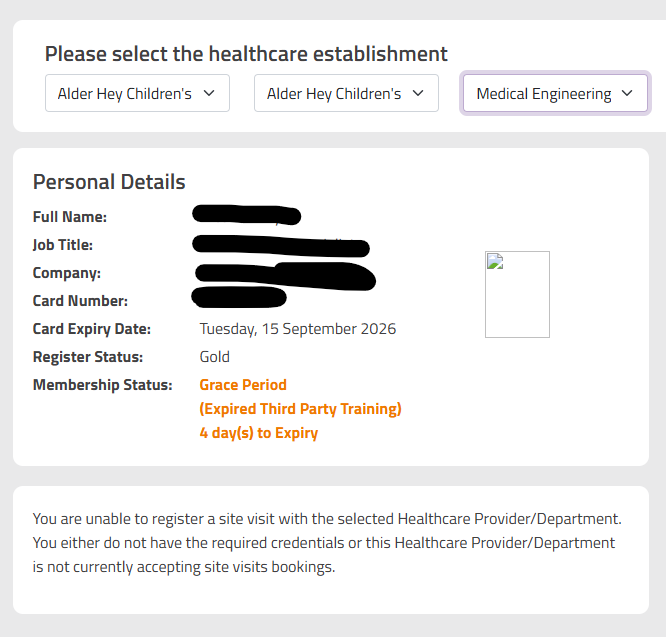
| | Healthcare providers will be able to see whether a representative is Active, Expired, or In Grace Period, along with details of what specifically has expired. |
|
|
|
Q1: Training expired but ID Card still valid?
A: Yes, members can still book visits.
Q2: ID Card expired?
A: No, members cannot book visits.
Q3: What does the orange status mean?
A: It indicates the representative is in the grace period.
Q4: Can healthcare providers see when a rep is in the grace period?
A: Yes, they will see the status along with details of what has expired.
Q5: I am in the grace period but the app says I am inactive, why?
A: This happens only when your MIA ID Card has expired. Your ID number becomes inactive until updated, so you’ll need to log in via the webpage.
If only your training has expired, the app will still work normally.
|
|
Need help? 🤝 We’re here to support you every step of the way.
📧 help@miaweb.co.uk or 📞 01732 920 900
The MIA Team |
|
|
|
You are receiving this email as a MIA Cardholder. Should you wish to change your email preferences, please do not hesitate to contact us at help@miaweb.co.uk |
|
|
|
|
|